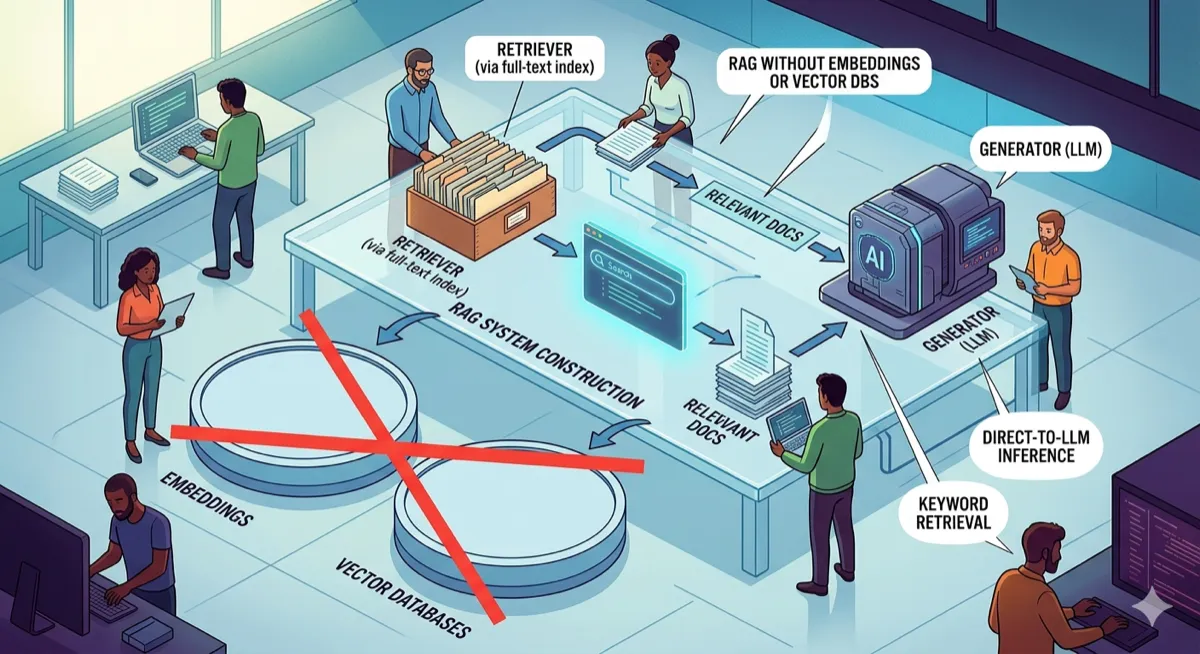
PageIndex turns documents into navigable trees. An LLM reasons through the hierarchy to find answers — no embeddings, no similarity search, just structured retrieval.
The Problem With Vector Search
Every RAG tutorial starts the same way: chunk your documents, generate embeddings, store them in a vector database, then retrieve by similarity search. This works. It also has problems that nobody talks about in the getting-started guides.
Embedding-based retrieval finds text that looks similar to your query. It does not understand document structure. A query about “shipping policies” might retrieve chunks from the returns section because both mention “days” and “refund.” The embedding model saw word overlap; it did not see that these are completely different topics in the table of contents.
Chunking destroys context. A 500-token chunk that starts mid-paragraph and ends mid-sentence loses the meaning that came from its position in the document. The chunk about “international shipping rates” makes less sense when you cannot see that it was a subsection of “Shipping Options” which was under “Order Fulfillment.”
Vector databases add infrastructure. Pinecone, Weaviate, Qdrant, Chroma — these are real systems that need to be provisioned, indexed, and maintained. For a simple Q&A bot over internal documentation, spinning up a vector store feels like bringing a forklift to move a chair.
There is another way.
How Humans Actually Search Documents
When you want to find something in a textbook, you do not read every page from the beginning. You open the table of contents, find the right chapter, look at the sections inside it, and go directly to the one you need.
This is hierarchical search. You navigate a tree structure, making decisions at each level about which branch to follow. The table of contents is your index. Your brain is the reasoning engine that picks the right path.
PageIndex works the same way. You give it a document, it builds a tree where each branch is a section and each leaf is the actual text, and then when you ask it a question, an LLM navigates that tree level by level to find the right answer.
No embeddings. No similarity search. Just an LLM reasoning through a hierarchy, the same way you would flip through a well-organized manual.
The Architecture
The system has two phases: index time (runs once per document) and query time (runs per question).
Index Time:
Document → LLM Segmentation → Hierarchical Tree → LLM Summarization → JSON Index- The document goes to an LLM that splits it into top-level sections
- Long sections get split recursively into subsections
- Each node gets an LLM-generated summary, built bottom-up
- The tree is serialized to JSON for reuse
Query Time:
Question → Load Index → Tree Navigation (LLM picks branches) → Leaf Content → LLM Answer- Load the pre-built tree from JSON
- Start at root, show the LLM all children’s summaries
- LLM picks the most relevant child
- Repeat until reaching a leaf node
- Pass leaf content + question to LLM for final answer
The key insight: summaries at each level let the LLM make informed routing decisions without reading the full text. A root summary of “Document covers returns, shipping options, and account setup” tells the LLM immediately which branch to take for a shipping question.
Step 1: Define the Node Structure
Every section of the document becomes a PageNode. It stores a title, raw text (for leaves), a summary (generated by LLM), and its children.
from dataclasses import dataclass, field
from typing import Optional


@dataclass
class PageNode:
    title: str
    content: str        # raw text, populated at leaves
    summary: str        # generated by LLM, populated by indexer
    depth: int          # 0 = root, 1 = section, 2 = subsection
    children: list = field(default_factory=list)
    parent: Optional["PageNode"] = None

    def is_leaf(self) -> bool:
        return len(self.children) == 0
Simple. A node is either a leaf (has content, no children) or an inner node (has children, content lives in descendants).
Step 2: Parse the Document Into a Tree
We build the tree in two passes. First, ask the LLM to split the whole document into top-level sections. Then, for any section long enough to be worth splitting further (more than 300 words), send it back to the LLM and get subsections.
import json
import openai
from .node import PageNode

client = openai.OpenAI()
SUBSECTION_THRESHOLD = 300  # words


def _segment(text: str) -> list:
    prompt = f"""Split the following text into logical sections.
Return a JSON object with a "sections" key. Each item has:
- "title": short title (5 words or less)
- "content": the text belonging to this section

Text:
{text[:8000]}"""

    response = client.chat.completions.create(
        model="gpt-4o",
        messages=[{"role": "user", "content": prompt}],
        max_completion_tokens=3000,
        response_format={"type": "json_object"},
    )
    parsed = json.loads(response.choices[0].message.content)
    return parsed.get("sections", [])


def parse_document(text: str) -> PageNode:
    root = PageNode(title="root", content="", summary="", depth=0)

    for item in _segment(text):
        title = item.get("title", "Section")
        content = item.get("content", "")

        node = PageNode(title=title, content="", summary="", depth=1)
        node.parent = root

        word_count = len(content.split())
        if word_count > SUBSECTION_THRESHOLD:
            subsections = _segment(content)
            if len(subsections) > 1:
                for sub in subsections:
                    child = PageNode(
                        title=sub.get("title", "Subsection"),
                        content=sub.get("content", ""),
                        summary="",
                        depth=2,
                    )
                    child.parent = node
                    node.children.append(child)
            else:
                node.content = content  # splitting gave nothing useful
        else:
            node.content = content  # short enough to stay as a leaf

        root.children.append(node)

    return root
After this, short sections are leaves with content. Long sections are inner nodes with subsection children. All summary fields are empty — the indexer fills those in next.
Step 3: Build Summaries Bottom-Up
We traverse the tree post-order (children before parent). Each leaf summarizes its own content. Each inner node gets a summary built from its children’s summaries. Post-order guarantees every child has a summary before its parent needs it.
import openai
from .node import PageNode

client = openai.OpenAI()


def _summarize(text: str, section_name: str = "") -> str:
    hint = f"This is the section titled: {section_name}.\n" if section_name else ""
    prompt = f"""{hint}Summarize the following in 2-3 sentences.
Be specific and factual. Do not add anything not in the text.

{text[:3000]}"""

    response = client.chat.completions.create(
        model="gpt-4o-mini",
        messages=[{"role": "user", "content": prompt}],
        max_completion_tokens=150,
    )
    return response.choices[0].message.content.strip()


def build_summaries(node: PageNode):
    # post-order: children first
    for child in node.children:
        build_summaries(child)

    if node.is_leaf():
        if node.content.strip():
            node.summary = _summarize(node.content, node.title)
        else:
            node.summary = "(empty section)"
    else:
        # build parent summary from children's summaries
        children_text = "\n\n".join(
            f"[{c.title}]: {c.summary}" for c in node.children
        )
        node.summary = _summarize(children_text, node.title)
After build_summaries(root), every node in the tree has a meaningful summary. The root’s summary is a high-level overview of the entire document. Each section’s summary describes what its subsections contain.
Step 4: Save and Load the Index
Serialize the tree to JSON so we only build it once.
import json
from .node import PageNode


def save(node: PageNode, path: str):
    def to_dict(n: PageNode) -> dict:
        return {
            "title": n.title,
            "content": n.content,
            "summary": n.summary,
            "depth": n.depth,
            "children": [to_dict(c) for c in n.children],
        }
    with open(path, "w") as f:
        json.dump(to_dict(node), f, indent=2)


def load(path: str) -> PageNode:
    def from_dict(d: dict) -> PageNode:
        node = PageNode(
            title=d["title"],
            content=d["content"],
            summary=d["summary"],
            depth=d["depth"],
        )
        for child_dict in d["children"]:
            child = from_dict(child_dict)
            child.parent = node
            node.children.append(child)
        return node
    with open(path) as f:
        return from_dict(json.load(f))
The index is just a JSON file. No database server. No embeddings to store. Version control it, ship it with your application, or regenerate it when the source document changes.
Step 5: Retrieve by Tree Navigation
Starting at root, the LLM reads the children’s summaries and picks the best branch. If that child is an inner node (it had subsections), repeat at that level. Keep going until hitting a leaf.
import openai
from .node import PageNode

client = openai.OpenAI()


def _pick_child(query: str, node: PageNode) -> PageNode:
    options = "\n".join(
        f"{i + 1}. [{c.title}]: {c.summary}"
        for i, c in enumerate(node.children)
    )
    prompt = f"""You are navigating a document tree to find the answer to a question.

Current section: "{node.title}"
Question: {query}

Children of this section:
{options}

Which child section most likely contains the answer? Reply with only the number."""

    response = client.chat.completions.create(
        model="gpt-4o-mini",
        messages=[{"role": "user", "content": prompt}],
        max_completion_tokens=5,
    )
    try:
        index = int(response.choices[0].message.content.strip()) - 1
        return node.children[index]
    except (ValueError, IndexError):
        return node.children[0]


def retrieve(query: str, root: PageNode) -> str:
    node = root
    while not node.is_leaf():
        if not node.children:
            break
        node = _pick_child(query, node)
    return node.content
The while loop handles any depth. A document with 3 levels of nesting works the same as one with 2. Each navigation step is a single LLM call with minimal tokens — just the summaries of the current node’s children.
What the Index Looks Like
After running build_index, the JSON looks like this:
{
  "title": "root",
  "summary": "Document covers returns, shipping options, and account setup.",
  "content": "",
  "depth": 0,
  "children": [
    {
      "title": "Returns and Refunds",
      "summary": "Refunds are processed within 14 days of receiving the returned item.",
      "content": "We accept returns within 30 days...",
      "depth": 1,
      "children": []
    },
    {
      "title": "Shipping Options",
      "summary": "Covers domestic (3-5 days) and international shipping (7-14 days).",
      "content": "",
      "depth": 1,
      "children": [
        {
          "title": "Domestic Shipping",
          "summary": "Standard delivery takes 3-5 business days via USPS.",
          "content": "We ship domestically via USPS...",
          "depth": 2,
          "children": []
        },
        {
          "title": "International Shipping",
          "summary": "International orders ship via DHL and arrive in 7-14 days.",
          "content": "International shipping is available to 50+ countries...",
          "depth": 2,
          "children": []
        }
      ]
    }
  ]
}
Short sections stay as depth-1 leaves. Long sections (like “Shipping Options”) become inner nodes with subsection children at depth 2. Retrieval navigates level by level until it hits a leaf.
When This Approach Wins
| Scenario | Vector RAG | PageIndex |
|---|---|---|
| Well-structured documents (manuals, policies, specs) | Works | Better — preserves structure |
| Documents with clear hierarchies | Loses hierarchy | Exploits hierarchy |
| Small-to-medium document sets | Overkill infrastructure | JSON file, no database |
| Questions about specific sections | Retrieves similar chunks | Navigates to exact section |
| Vague, semantic queries | Better | Struggles if summaries are too abstract |
PageIndex wins when your documents have structure and your questions map to that structure. “What’s the return policy?” navigates directly to the Returns section. “How do I ship internationally?” goes to Shipping → International.
Vector RAG wins when queries are semantically vague and the relevant content could be anywhere. “What should I know before ordering?” might need chunks from shipping, returns, and account setup — a tree-based approach would have to pick one branch.
Limitations and Gotchas
The LLM keeps picking wrong branches. Your summaries are too vague. Try a stronger model in _summarize or add more detail to the prompt. The summary is the only thing the navigation LLM sees — if it does not capture what is in the section, routing will fail.
LLM segmentation cuts a section in a bad place. When parse_document runs on a long document, it sometimes splits mid-thought. Fix this by increasing max_tokens in the segmentation call, or break the document into ~3000-word chunks before sending each one.
Leaf content is very long. If a leaf has more than ~1500 tokens of content, lower SUBSECTION_THRESHOLD so more sections get split into subsections. You want leaves small enough that the final answer generation has focused context.
Multiple relevant sections. Tree navigation picks one branch. If the answer spans multiple sections, you need a different approach — either retrieve from multiple branches (run navigation multiple times with different phrasings) or fall back to vector search for broad queries.
Index rebuild on document changes. The JSON index is static. When the source document changes, you need to rebuild the index. This is fine for documents that change infrequently (policies, specs, manuals) but problematic for frequently updated content.
The Complete Pipeline
import os
from pageindex.parser import parse_document
from pageindex.indexer import build_summaries
from pageindex.retriever import retrieve
from pageindex import storage
import openai

client = openai.OpenAI()
INDEX_PATH = "index.json"


def build_index(doc_path: str):
    print("Parsing document...")
    text = open(doc_path).read()
    tree = parse_document(text)

    print("Building summaries (this makes LLM calls)...")
    build_summaries(tree)

    print(f"Saving index to {INDEX_PATH}")
    storage.save(tree, INDEX_PATH)
    return tree


def ask(query: str) -> str:
    if not os.path.exists(INDEX_PATH):
        raise FileNotFoundError("Index not found. Run build_index() first.")

    tree = storage.load(INDEX_PATH)
    context = retrieve(query, tree)

    response = client.chat.completions.create(
        model="gpt-4o",
        messages=[{
            "role": "user",
            "content": f"Answer using only the context below.\n\nContext:\n{context}\n\nQuestion: {query}"
        }],
        max_completion_tokens=500,
    )
    return response.choices[0].message.content.strip()


if __name__ == "__main__":
    # First time: build the index
    build_index("document.md")

    # Then query it
    print(ask("What is your return policy?"))
Try It
git clone https://github.com/vixhal-baraiya/pageindex-rag.git
cd pageindex-rag
pip install openai
export OPENAI_API_KEY="sk-..."
python main.py- GitHub (MIT License)
- Python 3.10+
- OpenAI API (or any OpenAI-compatible endpoint)
Related articles
- RAG Is Lying to You: The Data Pipeline Failures Hiding Behind Your LLM — the pipeline failures that embedding-based RAG introduces
- Your Data Stack Wasn’t Built for This — how AI agents consume data differently
- The Database Endgame — the storage layer implications of retrieval systems
If you want to understand how different retrieval architectures compare at scale, Designing Data-Intensive Applications covers indexing strategies, from B-trees to LSM-trees to the tradeoffs that make systems like this possible.
Disclaimer: This article is based on the PageIndex RAG project’s public repository as of March 2026. The author has no affiliation with the project. Performance depends on document structure, query patterns, and LLM quality. Hierarchical retrieval works best on well-structured documents; unstructured content may perform better with embedding-based approaches. LLM costs for indexing scale with document size. Always validate retrieval quality on your specific use case before production deployment.

Comments
Loading comments...