GitNexus: The Tool That Gives AI Agents a Nervous System for Code
AI coding agents are blind. They read files but don’t see structure. A 16K-star open-source project is changing that by building knowledge graphs that make agents actually understand codebases.
Developer Tools | AI Agents | Code Intelligence | March 2026 ~14 min read
The edit that broke 47 things
Picture this. A developer asks Claude Code to refactor UserService.validate() — rename a parameter, clean up the return type. Simple change. The agent reads the file, makes the edit, runs the tests that exist in the same directory. Green. Ship it.
Except validate() is called by 47 other functions across 12 files. Three of those callers depend on the old return type. One is in a critical payment flow. The tests that would have caught it live in a completely different module that the agent never looked at.
This isn’t a hypothetical. It’s Tuesday.
AI coding agents — Cursor, Claude Code, Windsurf, Codex — are extraordinarily good at reading code and writing code. They are extraordinarily bad at understanding the invisible web of relationships between code. The call chains. The dependency graphs. The blast radius of a seemingly simple change.
They read files. They don’t see architecture.
GitNexus is building the missing layer. And based on its trajectory — 16,000+ GitHub stars in seven months, an active Discord, integrations with every major AI editor — it appears to have struck a nerve.
What GitNexus actually is
GitNexus is a knowledge graph engine for codebases. It parses a repository into an AST using Tree-sitter, resolves every import, function call, class inheritance chain, and interface implementation across files, then stores the result as a queryable graph. Every function, class, and module becomes a node. Every relationship — calls, imports, extends, implements — becomes an edge.
The graph is then exposed to AI agents via MCP (Model Context Protocol), the open standard that Anthropic introduced and that every major AI tool now supports. When an agent needs to understand the impact of a change, it doesn’t scan files — it queries the graph.
# That's it. Index the repo, register MCP, generate context files.
npx gitnexus analyze
After indexing, the AI agent gets seven tools it can call at any time:
| Tool | What it does |
|---|---|
| query | Hybrid search (BM25 + semantic + reciprocal rank fusion) |
| context | 360-degree view of any symbol — every caller, every dependent, every test |
| impact | Blast radius: what breaks if this changes? |
| detect_changes | Map a git diff to affected processes and risk levels |
| rename | Multi-file coordinated rename with graph + text search |
| cypher | Raw graph queries for anything else |
| list_repos | Discover all indexed repositories |
The agent doesn’t need to learn a new workflow. It just has better tools.
The core insight: precomputed intelligence
Traditional approaches to giving AI agents codebase awareness fall into two camps:
Camp 1: Read everything. The agent scans files, builds its own mental model, and hopes it sees enough. This is what most tools do today. It’s slow, token-expensive, and unreliable — the agent might find the 47 callers, or it might stop at 3.
Camp 2: Graph RAG. Index the codebase into a graph, let the agent query it. Better, but the agent still has to know what to ask. Traditional graph RAG requires multiple query rounds — “find callers,” then “find their files,” then “filter for tests,” then “assess risk” — each burning tokens and adding latency.
GitNexus takes a third approach: precomputed relational intelligence. The heavy analysis happens at index time, not query time. When an agent calls impact, it doesn’t get raw graph edges to explore. It gets a pre-structured response:
TARGET: Class UserService (src/services/user.ts)

UPSTREAM (what depends on this):
  Depth 1 (WILL BREAK):
    handleLogin [CALLS 90%] -> src/api/auth.ts:45
    handleRegister [CALLS 90%] -> src/api/auth.ts:78
    UserController [CALLS 85%] -> src/controllers/user.ts:12
  Depth 2 (LIKELY AFFECTED):
    authRouter [IMPORTS] -> src/routes/auth.ts
One tool call. Complete answer. Confidence scores included. The agent doesn’t have to explore the graph — the graph already did the exploration.
This has a subtle but important implication for model quality: smaller, cheaper models become viable. When the tool response already contains the full blast radius with confidence scores and depth grouping, even a lightweight model can make correct decisions. The intelligence is in the graph, not the model.
The indexing pipeline: how the graph gets built
GitNexus builds its knowledge graph through six phases:
Phase 1: Structure
Walk the file tree. Map folder and file relationships. Skip node_modules, .git, and anything in .gitnexusignore.
Phase 2: Parsing
Extract every function, class, method, and interface using Tree-sitter ASTs. This is the same parser that powers syntax highlighting in VS Code, Neovim, and Zed — battle-tested across billions of lines of code. GitNexus supports 13 languages: Python, TypeScript, JavaScript, Go, Rust, Java, C#, Ruby, Kotlin, Swift, PHP, C, and C++.
Phase 3: Resolution
This is where it gets interesting. Raw ASTs give local information — what’s defined in this file. Resolution connects the dots across files:
- Import resolution:
import { validateUser } from '../auth/validate'creates an edge from the importing file to thevalidateUserfunction node - Call resolution:
user.validate()insidehandleLogin()creates a CALLS edge between the two function nodes - Heritage resolution:
class AdminService extends UserServicecreates an EXTENDS edge - Constructor inference:
const service = new UserService()— subsequentservice.validate()calls resolve toUserService.validatevia type inference - Receiver resolution:
self.validate()in Python orthis.validate()in TypeScript resolves to the enclosing class’s method
This cross-file resolution is what separates a knowledge graph from a file index. Without it, the graph would know that handleLogin exists and validateUser exists, but not that one calls the other.
Phase 4: Clustering
Group related symbols into functional communities using the Leiden algorithm (via Graphology). The algorithm detects natural clusters — “these 23 functions and 4 classes form the authentication module” — without being told the project structure. This is used for process detection and for generating repo-specific agent skills.
Phase 5: Process Tracing
Trace execution flows from entry points (API handlers, CLI commands, main functions) through call chains. A “process” is a complete path: HTTP POST /login → authRouter → handleLogin → validateUser → checkPassword → createSession. These traces are pre-computed and served directly to agents, so they can understand complete workflows without manually following call chains.
Phase 6: Search Indexing
Build hybrid search indexes: BM25 for keyword matching, optional vector embeddings (via HuggingFace transformers.js) for semantic search, combined with reciprocal rank fusion. The search is process-grouped — results are organized by which execution flow they participate in, not just file location.
The entire pipeline runs in ~10 seconds for a 500-file project. Subsequent updates are incremental — SHA-256 hash checks detect which files changed, and only those are re-parsed and re-resolved. A 2,900-file project re-indexes in under 2 seconds.
Two interfaces, same graph
GitNexus ships as both a CLI and a browser-based web UI:
| CLI + MCP | Web UI | |
|---|---|---|
| Use case | Daily development with AI agents | Quick exploration, demos, one-off analysis |
| Scale | Any size repository | ~5K files (browser memory), or unlimited via backend mode |
| Storage | LadybugDB native (persistent) | LadybugDB WASM (in-session) |
| Privacy | Everything local | Everything in-browser, no server |
The web UI is a visual graph explorer — a force-directed visualization (Sigma.js + WebGL) where nodes are functions and classes, edges are relationships, and clusters are color-coded communities. Drop in a GitHub URL or a ZIP file and get an interactive knowledge graph in seconds. No install, no account, no data leaving the browser.
But the CLI + MCP integration is where the real value lives. Running gitnexus analyze does four things:
- Indexes the codebase into a knowledge graph
- Registers an MCP server that any compatible AI editor can use
- Installs agent skills (
.claude/skills/) for Claude Code - Creates
AGENTS.mdandCLAUDE.mdcontext files
After that, the AI agent has a nervous system. It doesn’t just read files — it understands topology.
The Claude Code integration goes deeper
Most MCP tools give editors a set of callable functions and stop there. GitNexus’s Claude Code integration goes further with hooks — automatic behaviors that fire before and after tool calls:
PreToolUse hooks: Before Claude performs a search or reads a file, the hook enriches the request with graph context. The agent doesn’t need to remember to check the graph — it happens automatically.
PostToolUse hooks: After a git commit, the graph re-indexes automatically. The agent’s view of the codebase stays current without manual intervention.
This creates a closed loop: agent edits code → commit triggers re-index → next query reflects the change. The graph is never stale.
GitNexus also generates repo-specific skills via --skills. Using the Leiden community detection from Phase 4, it identifies the functional areas of a codebase and generates a skill file for each one — describing key files, entry points, execution flows, and cross-module connections. When a developer says “help me modify the authentication flow,” Claude Code loads the authentication skill and gets targeted context for exactly that area.
Why this matters now
Three converging trends explain why GitNexus hit 16,000 stars in seven months:
1. MCP created the integration layer
Before MCP, every AI tool had its own proprietary way to connect to external data. Building a code intelligence engine meant building separate integrations for Cursor, Claude Code, Windsurf, and every other editor. MCP standardized the interface. GitNexus implements one MCP server and gets compatibility with all of them.
The timing wasn’t coincidental. MCP adoption reached critical mass in late 2025. By early 2026, the question shifted from “should AI agents use external tools?” to “which tools should they use?” GitNexus was ready with an answer.
2. Agent reliability became the bottleneck
The initial excitement of AI coding assistants (“it can write code!”) gave way to production reality (“it writes code that breaks other code”). As teams moved from using AI for isolated functions to using it for multi-file refactors, the reliability gap became impossible to ignore.
The pattern was consistent: the AI would make a locally correct change that was globally wrong. It would rename a function without updating callers. It would change a return type without fixing downstream consumers. It would add a parameter without updating tests in a different module.
These are all problems that a dependency graph solves trivially. The graph knows every caller. The graph knows every test. The graph knows the blast radius. The missing piece was getting that graph into the agent’s hands — which is exactly what GitNexus does.
3. Token costs compound at scale
A single AI-assisted code review on a large repository can consume 50K-100K tokens. For teams running dozens of reviews per day, the cost is non-trivial. More importantly, the quality degrades as context grows — a model reading 100K tokens of code produces worse reviews than one reading 5K tokens of precisely selected code.
GitNexus’s benchmarks show 4.9x to 27x token reduction on real repositories, with higher review quality. For engineering organizations, that’s a cost reduction and quality improvement simultaneously — a rare combination.
The broader pattern: code intelligence as infrastructure
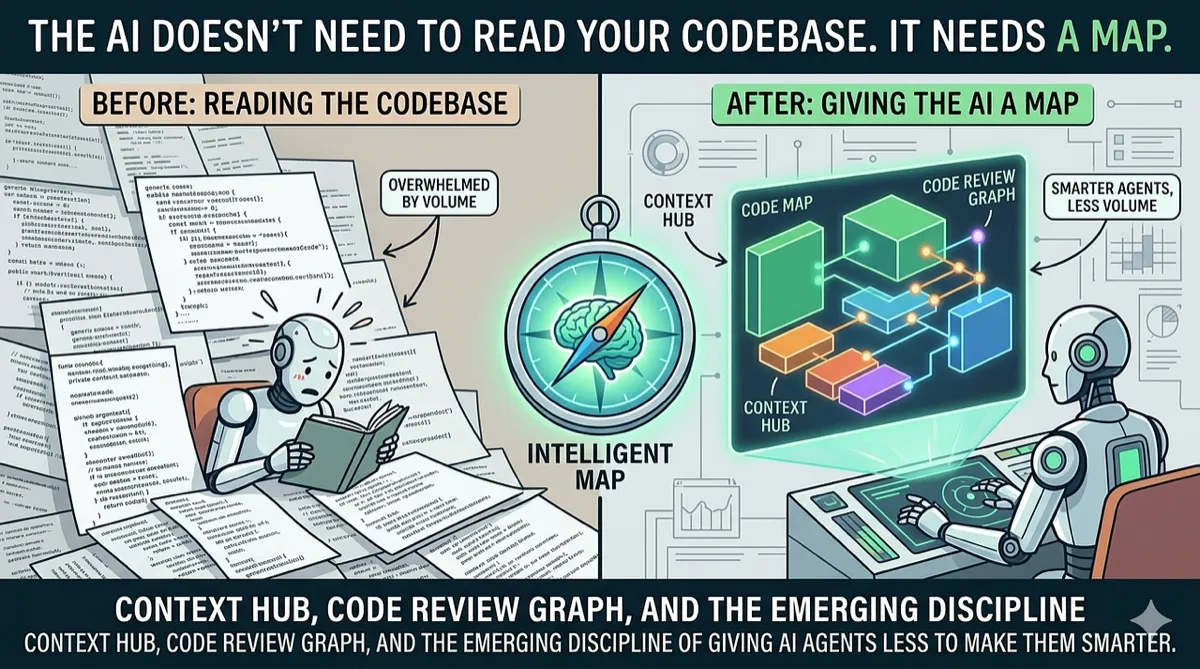
GitNexus isn’t the only project in this space. Code Review Graph builds similar blast-radius analysis with Tree-sitter. Context Hub from Andrew Ng’s team provides curated documentation layers for agents. Various MCP servers are emerging to give agents access to databases, APIs, and infrastructure.
What they all share is a conviction: the next leap in AI coding quality won’t come from better models. It will come from better context.
The model wars — GPT vs. Claude vs. Gemini vs. open-source — dominate the headlines. But the teams shipping reliable AI-assisted code in production are quietly investing in context infrastructure: knowledge graphs, structural parsers, dependency analyzers, curated documentation layers. The model is becoming a commodity. The context pipeline is becoming the moat.
GitNexus’s tagline calls it “a nervous system for agent context.” That metaphor is apt. A brain without a nervous system can think but can’t feel — it has no awareness of the body it’s controlling. An LLM without a code graph can generate but can’t perceive — it has no awareness of the codebase it’s modifying.
The nervous system doesn’t make the brain smarter. It makes it informed.
Where it falls short
Large monorepos strain memory. The web UI caps out around 5K files before browser memory becomes an issue. The CLI handles larger repos but indexing a 50K+ file monorepo still takes minutes and consumes significant RAM during the initial parse.
Dynamic languages are harder. Python and JavaScript with heavy metaprogramming, dynamic imports, or runtime code generation produce incomplete graphs. The static analysis can’t trace getattr(module, func_name)() or require(variablePath). The graph is accurate for what it can see, but duck typing hides relationships.
The learning curve for Cypher. The cypher tool gives raw access to the graph, but writing effective Cypher queries requires understanding both the query language and GitNexus’s schema. Most developers will stick to the high-level tools.
Noncommercial license. GitNexus uses the PolyForm Noncommercial License 1.0.0. Free for personal use, open-source projects, and evaluation. Commercial use requires a separate license. This limits adoption in some enterprise contexts.
Try it
CLI + MCP (for daily development):
npx gitnexus analyze # Index your repo + register MCPThen open the project in Claude Code, Cursor, or any MCP-compatible editor. The agent automatically has access to the graph tools.
Web UI (for quick exploration):
Visit gitnexus.vercel.app, drop in a GitHub URL or ZIP, and start exploring.
- GitHub — 16K+ stars, PolyForm Noncommercial License
- Discord — active community
- npm —
npm install -g gitnexus
Supports 13 languages. Runs entirely local. No cloud, no accounts, no data leaving the machine.
Disclaimer: This article is based on GitNexus’s public documentation, README, and published benchmarks as of March 2026. The author is not affiliated with the GitNexus project or its maintainers. Benchmark numbers are sourced from the project’s own published results and have not been independently verified. GitNexus is licensed under the PolyForm Noncommercial License 1.0.0 — commercial use requires a separate license. Star counts and community metrics reflect a snapshot in time and may change. Mention of other projects (Code Review Graph, Context Hub) is for context only and does not imply endorsement or affiliation. Note: GitNexus has no official cryptocurrency, token, or coin — any such claims are scams.
Comments
Loading comments...