Karpathy Stopped Using LLMs to Write Code. He’s Using Them to Think.
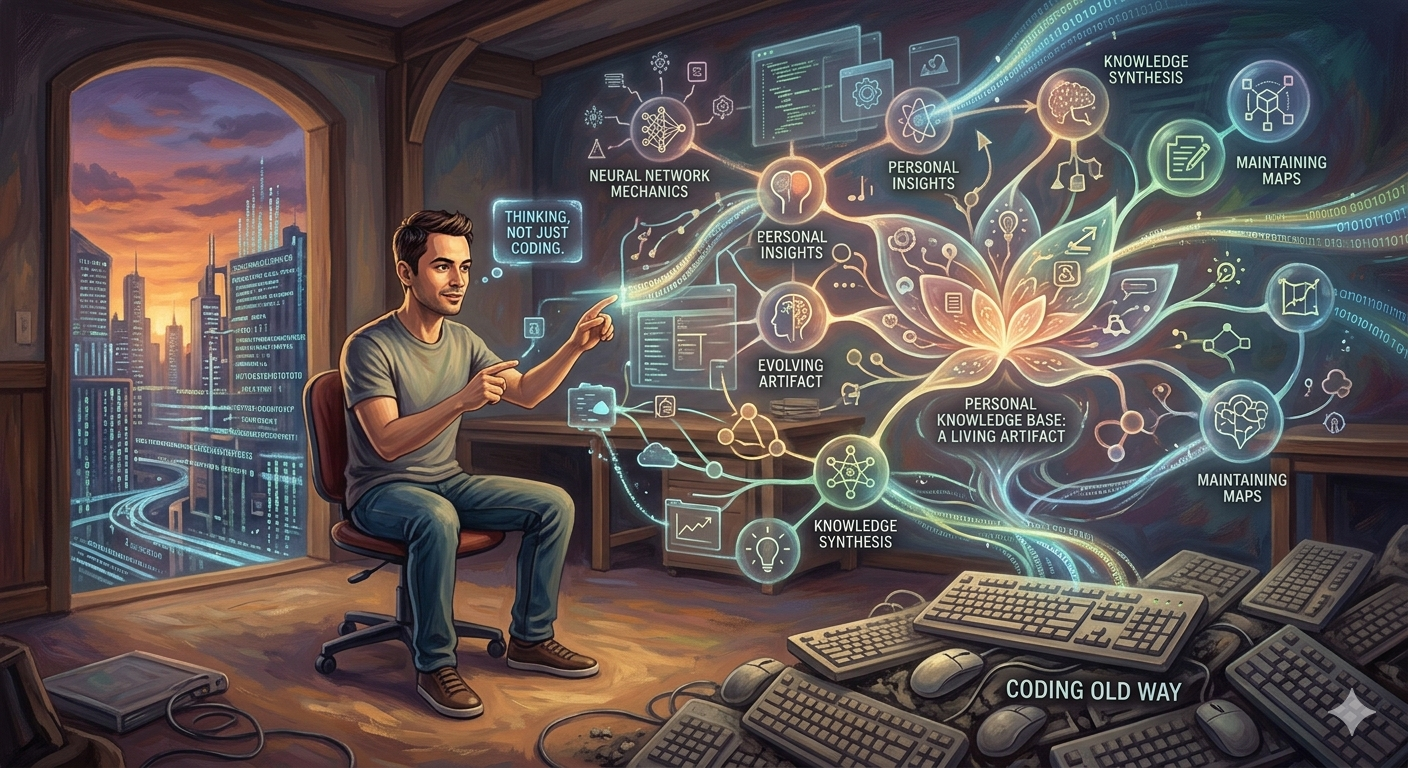
In a detailed X post, Andrej Karpathy described a workflow where LLMs don’t just answer questions — they compile, maintain, and evolve a personal knowledge base as a living artifact.
AI Engineering | Knowledge Management | April 2026
~11 min read
Most people use LLMs the way they use a search engine with better grammar. You ask, it answers, you close the tab. The conversation is ephemeral. The model forgets. Your own understanding improves slightly, then diffuses back into the noise of the next task.
Andrej Karpathy described something categorically different in an April 2, 2026 post on X. He’s using LLMs not as answer machines but as knowledge compilers — tools that take raw, unstructured research material and incrementally build a structured, interconnected, queryable personal wiki. One where the LLM writes almost everything, he reads almost everything, and the entire system compounds over time rather than resetting with each conversation.
“A large fraction of my recent token throughput is going less into manipulating code, and more into manipulating knowledge,” he wrote. That sentence is worth sitting with. One of the world’s most prominent ML researchers has shifted the majority of his AI compute budget from code generation to knowledge synthesis. That’s a signal worth paying attention to.
| Metric | Value |
|---|---|
| Articles in Karpathy’s current research wiki | ~100 |
| Words compiled and maintained by LLM | ~400K |
| Vector databases required | 0 — no RAG needed at this scale |
The Architecture Is Deceptively Simple
The entire system rests on a two-directory structure and a principle: the LLM writes, you read.
Layer 1: Sources (raw/ directory)
Articles, papers, repos, datasets, images — anything relevant to the research topic. Web articles become markdown via Obsidian Web Clipper. Images downloaded locally via hotkey for LLM direct reference. This is the only layer you actively manage.
Layer 2: Wiki (compiled .md files)
Summaries of all raw/ content. Backlinks. Concept articles. Interlinked entries. Auto-maintained index files with brief summaries of each document. LLM writes and maintains all of it. You rarely touch it directly.
Layer 3: Outputs (rendered artifacts)
Markdown reports. Marp slideshows. Matplotlib charts. All viewed in Obsidian. Each output gets filed back into the wiki, so every query enhances the knowledge base for the next one. Your explorations compound.
Layer 4: Linting (wiki integrity passes)
LLM sweeps to find inconsistencies, impute missing data via web search, surface candidates for new articles, suggest follow-up questions. Ongoing maintenance that the LLM owns, not you.
Obsidian is the frontend throughout — a local-first markdown IDE where you can see the raw sources, the compiled wiki, and all generated outputs simultaneously. Karpathy uses Marp (a markdown-to-slides plugin) for slideshow outputs, and matplotlib for charts. The key architectural decision is that Obsidian is purely a reading and viewing layer. The LLM writes. You don’t.
Why This Matters More Than It Looks
The most interesting thing about this workflow isn’t the tooling. It’s the epistemological shift it represents. Traditional note-taking is pull-based — you decide what to write, when to write it, and how to organise it. The knowledge structure is shaped by what you happen to think of at the moment you’re taking notes. Connections between ideas form slowly, if at all, because making them requires going back through existing notes with the explicit intention of linking them.
Karpathy’s system is push-based. You drop raw material into a directory. The LLM decides what concepts emerge from it, writes the articles, creates the backlinks, and builds the structure. Your job is to consume the output and decide what raw material to add next. The knowledge architecture is shaped by what’s actually in the corpus, not by what you happen to be thinking about on a given afternoon.
“I thought I had to reach for fancy RAG, but the LLM has been pretty good about auto-maintaining index files and brief summaries of all the documents and it reads all the important related data fairly easily at this ~small scale.”
— Andrej Karpathy, X, April 2, 2026
That parenthetical — “at this ~small scale” — is the honest self-caveat that makes the observation useful rather than breathless. At ~100 articles and ~400K words, the index-and-summary approach works because the LLM can hold enough of the relevant context without needing vector search to find it. This is a workflow for a focused research topic, not for a decades-long personal knowledge system spanning thousands of documents.
The filing loop is the subtler innovation. When you ask a question, the LLM generates an output — a markdown report, a slide deck, a chart. You view it in Obsidian. Then, crucially, you file it back into the wiki. That output becomes a new source document that future queries can draw on. Your own thinking, once externalized, becomes part of the corpus that shapes future thinking. Every good question makes the next questions better.
The compounding effect: This is the mechanism most note-taking systems fail to deliver on: genuine compounding. Roam Research promised it. Notion workflows gesture at it. Most personal knowledge management systems don’t actually produce it because the human bottleneck — deciding what to write, when to link, how to categorise — limits how fast the structure can grow. Delegating that structure entirely to the LLM removes the bottleneck.
How to Build This Yourself
The system is deliberately low-tech. There’s no vector database, no complex infrastructure, no specialised RAG pipeline.
Step 1: Set up your directory structure
Create a root directory for your research topic. Inside it: raw/ for source material, wiki/ for the compiled output, and output/ for query results. Point Obsidian at the root directory so you can see all three simultaneously.
Step 2: Configure your ingest toolchain
Install the Obsidian Web Clipper browser extension. Articles and blog posts can be clipped directly to raw/ as markdown. For PDFs and papers, use a CLI tool like marker or docling to convert to markdown. Download relevant images locally so the LLM can reference them directly rather than through URLs.
Step 3: Write your compilation prompt
This is the prompt you run incrementally as raw/ grows. It should instruct the LLM to: scan all files in raw/, write or update summaries for each, extract concept articles, maintain an index.md with one-paragraph summaries of every wiki article, and create backlinks between related entries. Run this after every significant batch of new raw material.
Step 4: Build the linting pass
A separate prompt that sweeps the wiki looking for: inconsistent claims across articles, gaps where web search would fill missing data, interesting connections that don’t yet have a dedicated article, and questions the wiki suggests but doesn’t answer. Run this periodically — weekly if you’re actively adding material.
Step 5: Establish the Q&A and filing loop
When you have a question, ask the LLM to research the answer using the wiki as its primary source. Specify an output format — a markdown report with citations, a Marp slideshow, a matplotlib chart. Crucially, instruct it to save the output to output/ and suggest whether it should be filed into wiki/ as a new article. Accept the ones worth keeping.
The minimal viable prompt for compilation
# Compile Wiki from Raw Sources

You are managing a personal research wiki on [TOPIC].
Your job is to compile and maintain the wiki based on the raw source material.

Directories:
  raw/   — source documents (articles, papers, images). READ ONLY.
  wiki/  — your compiled wiki. You own this entirely.

For each new or updated file in raw/:
  1. Write or update a summary entry in wiki/summaries/[doc-name].md
  2. Extract key concepts and add or update articles in wiki/concepts/
  3. Update wiki/index.md — one paragraph per wiki article, kept current
  4. Add backlinks: each concept article should reference related articles
  5. Tag any image references so I can view them in Obsidian

Rules:
  — Never ask me to review before writing. Write directly to disk.
  — Prefer updating existing articles over creating redundant new ones.
  — Every claim in the wiki should be traceable to a file in raw/.
  — Use wiki-link syntax: [[Article Name]] for internal links.
  — Keep article filenames lowercase-hyphenated: transformer-attention.md

After compiling, output a brief change summary:
  — Articles created: N
  — Articles updated: N
  — Concepts added to index: N
  — Backlinks added: N
On model choice: Karpathy notes that the latest LLMs are “quite good at it.” For a wiki at this scale, any frontier model with a large context window works well — the index.md approach means the model can load the full index plus relevant articles without needing vector search. Models with 128K+ context (Claude Opus, Gemini 1.5/2.0, GPT-4o) handle it cleanly.
Honest Caveats — What This System Isn’t
Karpathy is careful here, and it’s worth being equally careful when translating his workflow.
It’s not a replacement for RAG at scale. He explicitly notes “at this ~small scale.” A 100-article, 400K-word wiki is large enough to be genuinely useful and small enough that a capable LLM can navigate it via indexes without vector retrieval. If your knowledge base grows to thousands of documents, the index approach will start to break down.
It’s not zero maintenance. You still curate what goes into raw/. The quality of the wiki is bounded by the quality of its source material. And the linting passes need your review; accepting every LLM-suggested new article uncritically would quickly produce sprawl.
It doesn’t work without the filing loop. The compounding property only holds if you consistently file outputs back into the wiki. If you treat query outputs as ephemeral, the system behaves like a slightly fancier chatbot.
Setup requires effort Karpathy doesn’t mention. He’s comfortable with CLIs, markdown pipelines, and prompt engineering at a level most users aren’t. The prompt engineering to get reliable compilation, consistent backlink structure, and useful linting output takes real iteration. Karpathy himself ends the post with: “I think there is room here for an incredible new product instead of a hacky collection of scripts.” He’s describing his own system as hacky.
The tool that doesn’t exist yet: What Karpathy is describing manually — ingest → compile → Q&A → lint → file → loop — is a well-defined product loop. Someone will build it as a first-class application: drag-and-drop raw sources in, get a navigable wiki out, query it with structured output formats, lint it on a schedule. The pieces exist individually (Obsidian, Web Clipper, Claude Code, Marp). The integrated product doesn’t exist yet.
The Mental Model Shift This Points To
The coding use case for LLMs is well-established: you describe intent, the model produces code, you review and ship. The model is a fast typist who knows a lot of syntax. That framing has been productive and will continue to be.
What Karpathy is demonstrating is a different relationship: the LLM as a knowledge infrastructure operator. Not a tool that produces artifacts for you to review, but a system that maintains a living knowledge artifact on your behalf. You are the curator of inputs and the consumer of outputs. The LLM is the librarian, the indexer, the article writer, and the fact-checker — all running continuously in the background of your research.
The practical implication for AI and data engineers is direct. If you’re deep in a research domain — a new framework, a regulatory landscape, a competitive market, a technical area with fast-moving literature — this workflow turns your reading into a compounding asset instead of an evaporating one. Every paper you clip, every article you ingest, every output you file back in makes the next question easier to answer. The knowledge doesn’t dissipate when you close the conversation. It accumulates.
That’s a genuinely different thing from what most people are doing with frontier models. And it doesn’t require any infrastructure beyond a directory, a good prompt, and the discipline to file things back in.
Karpathy’s last line hints at the future he’s imagining: synthetic data generation and fine-tuning so the LLM eventually “knows” the domain in its weights rather than just through context windows. A model that has genuinely internalised your research corpus as part of its own knowledge, not just retrieved it. That’s further out. But the step he’s describing now — from ephemeral chat to persistent, self-improving knowledge base — is available today, with tools that already exist.
Source: Andrej Karpathy, X, April 2, 2026. Supported by community analysis at Glen Rhodes, DeepakNess, and HowAIWorks. GitHub implementation: rvk7895/llm-knowledge-bases.
If you’re designing systems where knowledge management and data organization matter, Fundamentals of Data Engineering provides essential foundations for understanding how to structure data pipelines and storage systems that scale.
The views expressed in this article are my own and do not reflect those of my employer, Mercedes-Benz. I am not affiliated with any of the companies or products mentioned. This article is based on publicly reported information and independent analysis.
Comments
Loading comments...